SQL Server Analysis Services Sequence Clustering Part 2

In the first post of this series, I demonstrated how to model the data for this project. This post walks though using the SQL Data Tools to set up the model. Open the SQL Data Tools and select Analysis Services Multidimensonal and Data Mining Project.  Name your project (I named mine SequenceClustering) and enter a location to save the files.  Click Ok

The SQL Data Tools now opens the workspace that you will use to create your model.  Right click on Data Sources to use the wizard to tell the tool where your data is stored. 

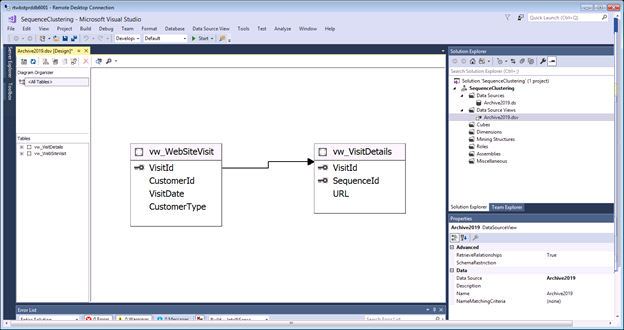
Now you are going to tell SQL Data Tools how your data is structured. Right click on Data Source Views.  This will open a wizard that will ask you to confirm your data source and then ask you to select the objects from that data source that you want to use.

For this example, there are 2 tables:
Right click on Mining Structures and click Create New Mining Structures.  This opens a wizard to walk you through creating the structure.

Tell the wizard to create the structure from an existing relational database or data warehouse and click next.

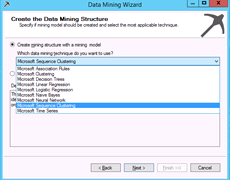
Select Microsoft Sequence Clustering from the data mining technique drop down and click Next
Now we set up the Case and Nested table roles.  VisitDetails is the nested table and WebSiteVisit is the case table.  Once you click the right boxes, click next.

Now the wizard will ask you what you want to be able to predict from this model and what you want to use as input to create those predictions. 

In the next step, the model is confirming the data types

Click next

At this end of this process, you should have something that looks like this:

Now that you’ve created the data mining objects, it’s time to let your model read the underlying data and make sense of it.  Right click on the model and click process.

After you click Run, the model will start reading data and creating sequence clusters.
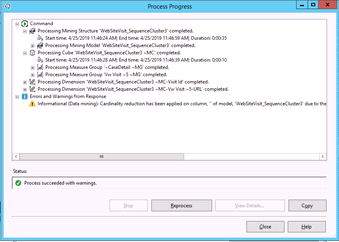
This processing provides data to the model so it can determine the appropriate clusters for the sequences. After it is done, you will be able to browse and query the data. I will walk you through that in the next post.

SQL Server Analysis Services: Sequence Clustering

Why didn’t SSAS’s data mining tool receive more attention or more buzz in the tech world? There doesn’t seem to be a lot of documentation or tutorials beyond Microsoft’s AdventureWorks models. But it can be a very simple solution for predictions or analytic uses. Here’s my very simple explanation for setting up a sequence cluster model to predict URL paths. There will be 3 parts and today’s post is starting at the very beginning explaining how to model your data. You can have a sequence cluster up and running within an hour.

Correctly modelling your data is the hardest step of the whole process.  However, once you understand the requirements and set up your tables correctly, the rest of the process is easy. The sequence cluster model requires two tables.  The first is a case table which holds a key to identify each visit and other non-sequenced attributes, such as a customer identifier, visit date and customer type.  Here’s an example of what is in this table .

VisitId CustomerId VisitDate CustomerType
1 134123412 2-5-19 P (for Purchaser)
2 2352323 2-5-19 F (for Free Registered Users)
3 23523452345 2-5-19 N (for non-Registered Users)
4 323452345 2-5-19 P

The nested table holds the sequence data for each visit. Our data looks something like this:

VisitIdSequenceIdURL
11/level1/level2/page.aspx
12/level1/level2/page2.aspx
13 /level1/level2/page3.aspx
21/level1/level2/page4.aspx
22/level2/level2/page2.aspx

Tomorrow, I will walk you through using SQL Data Tools to set up your model.


Engage in Meaningful, Creative Work

Several years ago I read an article about the things that lead us to greater health and happiness.  Besides telling readers to volunteer and stop watching so much TV or spending so much time with social media, the article had a topic titled “Engage in Meaningful, Creative Work”.  It said to do things that challenge creativity and make us feel productive.

I haven’t always felt that the work I did is meaningful or creative.  This blog is a now going to serve as my creative outlet and if it helps someone understand SQL Server better, then that’s a plus too!